Posts & guides / Setup guide
The Instagram AutoDM setup checklist
Six steps from a fresh professional account to your first automated DM — with a done-check on each step so you know you're safe to move on. The whole list runs about ten minutes.
1.0
Switch Instagram to a professional account
AutoDM sends DMs through Instagram's official messaging API, and Instagram reserves that channel for professional accounts. In the Instagram app: Settings and activity → Account type and tools → Switch to professional account. Choose Creator or Business — either works. It's free and your posts and followers stay untouched. Note: switching back to a personal account disables API messaging and pauses your automations.
Done when:Your profile shows a category label and a Contact button.
2.0
Connect the account in AutoDM
Create your free AutoDM account, open Accounts, and connect Instagram. The hand-off happens on Instagram's own login screen — AutoDM receives an access token, never your password. The dashboard shows token health per account, so an expired token surfaces as a warning — check it if an automation goes quiet.
Done when:The Accounts screen lists your username with a Healthy token badge.
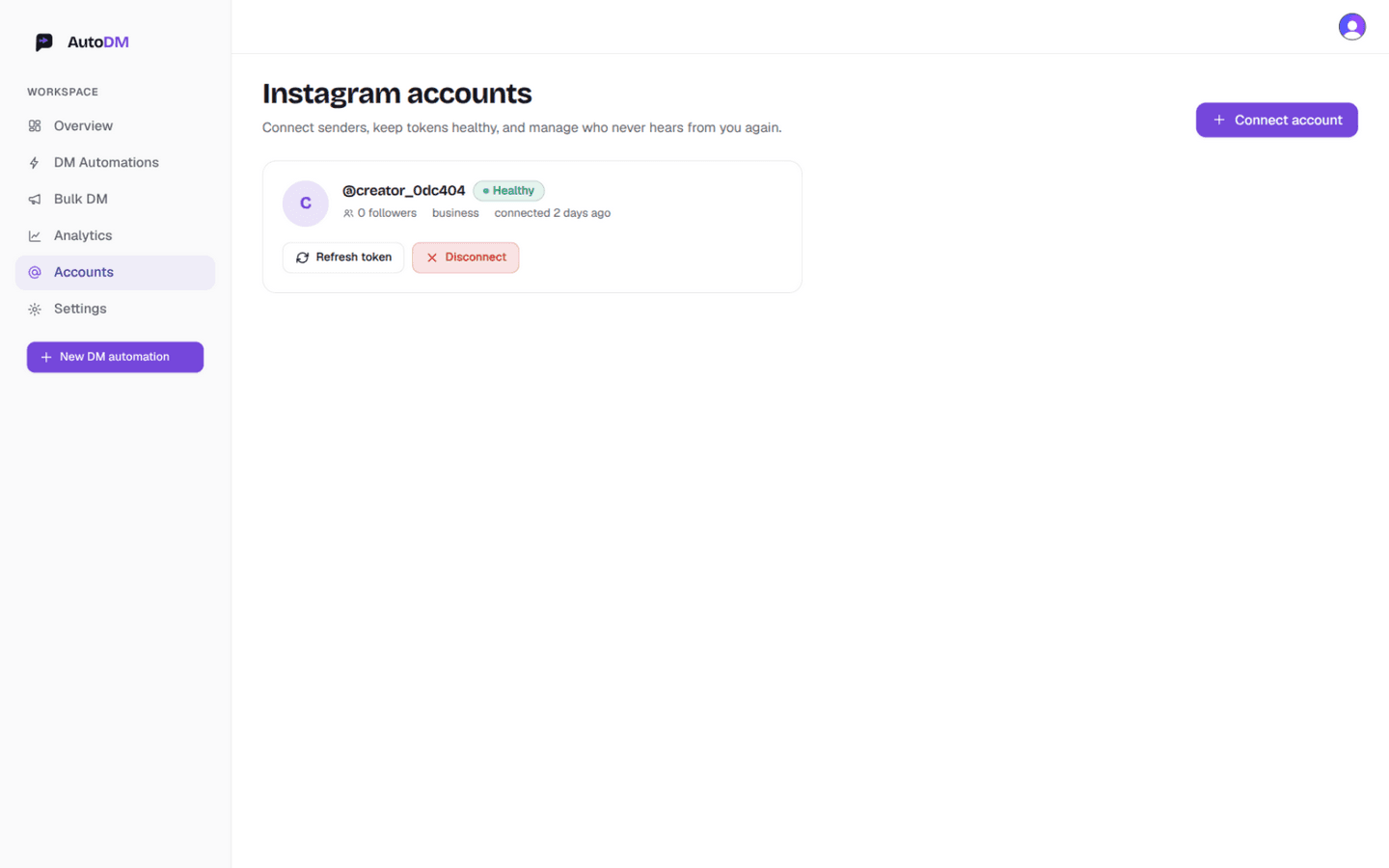
Accounts screen — connected, token healthy. 3.0
Choose what fires the DM
A simple setup is a single memorable keyword: LINK for drop pages, PRICE for catalogues, PLAN for coaching offers. Prefer no keyword at all? Any-comment mode covers every eligible commenter (opt-outs, repeat windows and rate limits still apply). You can also automate story replies — that trigger lives in the same wizard. Decide here whether the rule watches one specific post or your whole account.
Done when:You can say it in one sentence: “When someone comments LINK on any post, DM them the link.”
4.0
Arm the automation in the wizard
New DM automation walks you through three steps. Content: pick Any post or reel or scope to one post. Trigger: set keywords with match type — whole-word matching keeps “LINK” from firing on “hyperlink”; any-comment needs no keywords at all. Story replies: open the Fires-on dropdown and pick Replies to my stories.
Done when:The Trigger step shows your keyword chips (or any-comment selected) and the match type you chose.
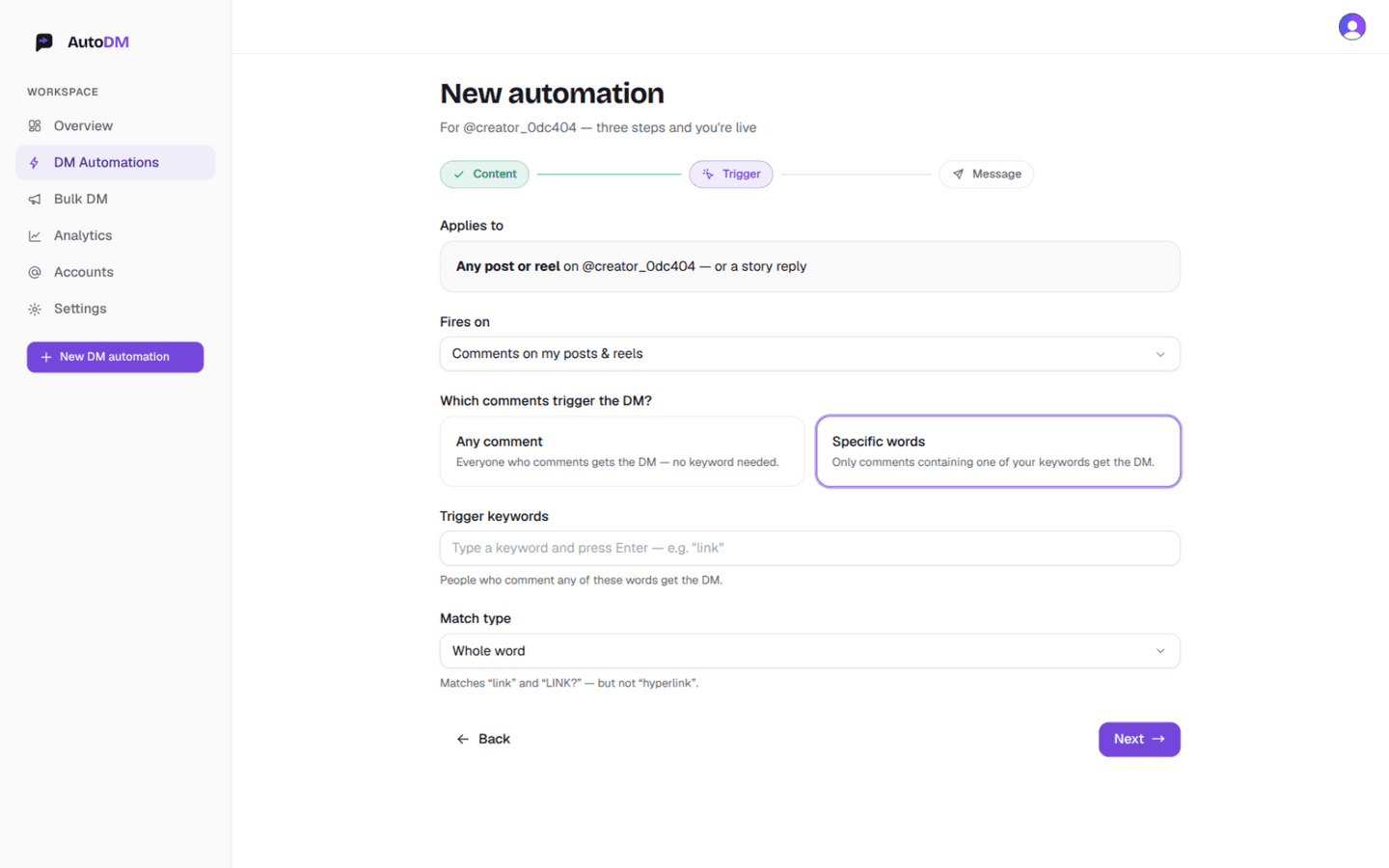
Trigger step — trigger, scope and match type in one screen. 5.0
Write the DM and set repeat protection
The message step personalizes itself: {{name}} and {{username}} fill in per follower. Keep the first sentence human — “Hey {{name}}! Here's the link you asked for” reads better than a paragraph of pitch. Set repeat protection (7 days is a good default) so the same person isn't messaged again inside your window, check the live preview bubble, and create the automation.
Done when:The preview bubble reads like a message you'd send a friend, and the summary spells out exactly what you armed.
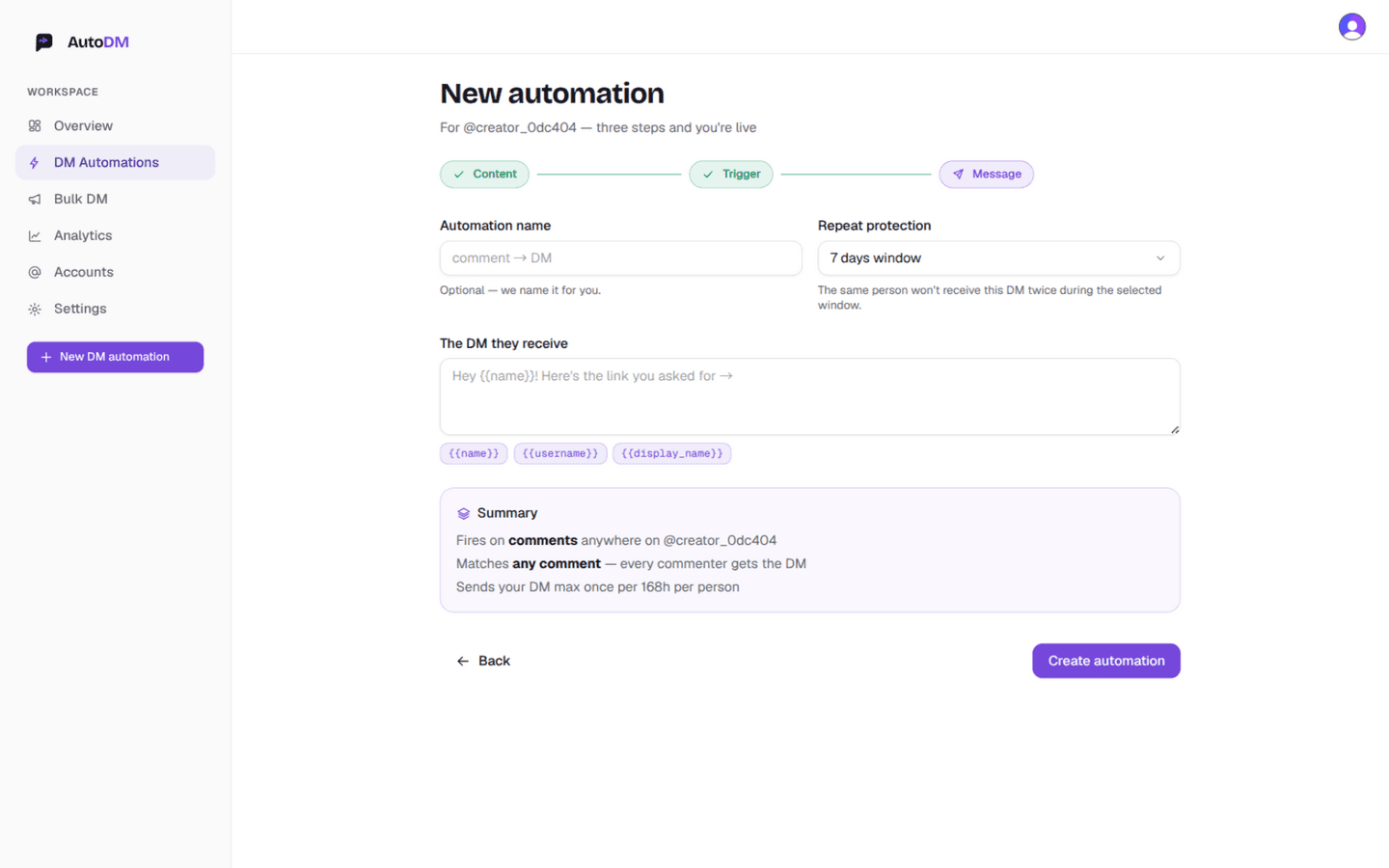
Message step — write once, personalized for everyone. 6.0
Test it end to end
Comment the keyword from a second account — or a friend's account — on the post you scoped. The DM should land shortly, personalized with that account's name — give it up to a minute before debugging. If nothing arrives, jump to troubleshooting below: most often it's the automation toggle, an expired token, or a suppression (opt-out / repeat window).
Done when:The test DM arrives, personalized, shortly after the comment.
The test DM didn't arrive?
The most common causes, in order:
- 1.
The automation toggle is off
Open DM Automations and check the switch on the rule. A paused rule matches nothing, silently.
- 2.
The token went stale
Accounts screen → token badge. Anything other than Healthy: hit Refresh token, then re-test.
- 3.
The keyword didn't match the way you expected
Whole-word matching ignores “LINKS” when your keyword is “LINK”. Switch match type to Contains while testing, then tighten it back.
- 4.
The account isn't professional (or the test came too fast)
Instagram's API only reports comments on professional accounts — and give the test comment up to a minute. Step 1 exists for a reason.
Checklist complete. Where next?
Two directions from here, both covered in depth:
- Instagram comment auto-replyKeyword matching, any-comment mode, repeat protection — the full mechanics.
- Instagram story reply automationThe second trigger, and why story rules run account-wide.